Online Job Application Form: A Practical Guide
October 14, 2026

You’re facing an online job application form, with your resume open in one tab, your cover letter in another, and that familiar feeling that a simple mistake could cost you the opportunity. In reality, this form is not just a formality. It’s often the first screening, the first test of accuracy, and sometimes the only place where your application will be carefully reviewed.
The best approach is not to “fill it out quickly,” but to fill it out correctly, neatly, and methodically to avoid unnecessary fields, inconsistencies, and technical glitches. A well-completed form can speed up your application process. A poorly handled one can make your application disappear before a recruiter even opens your file.
The Real Role of the Application Form in Recruitment
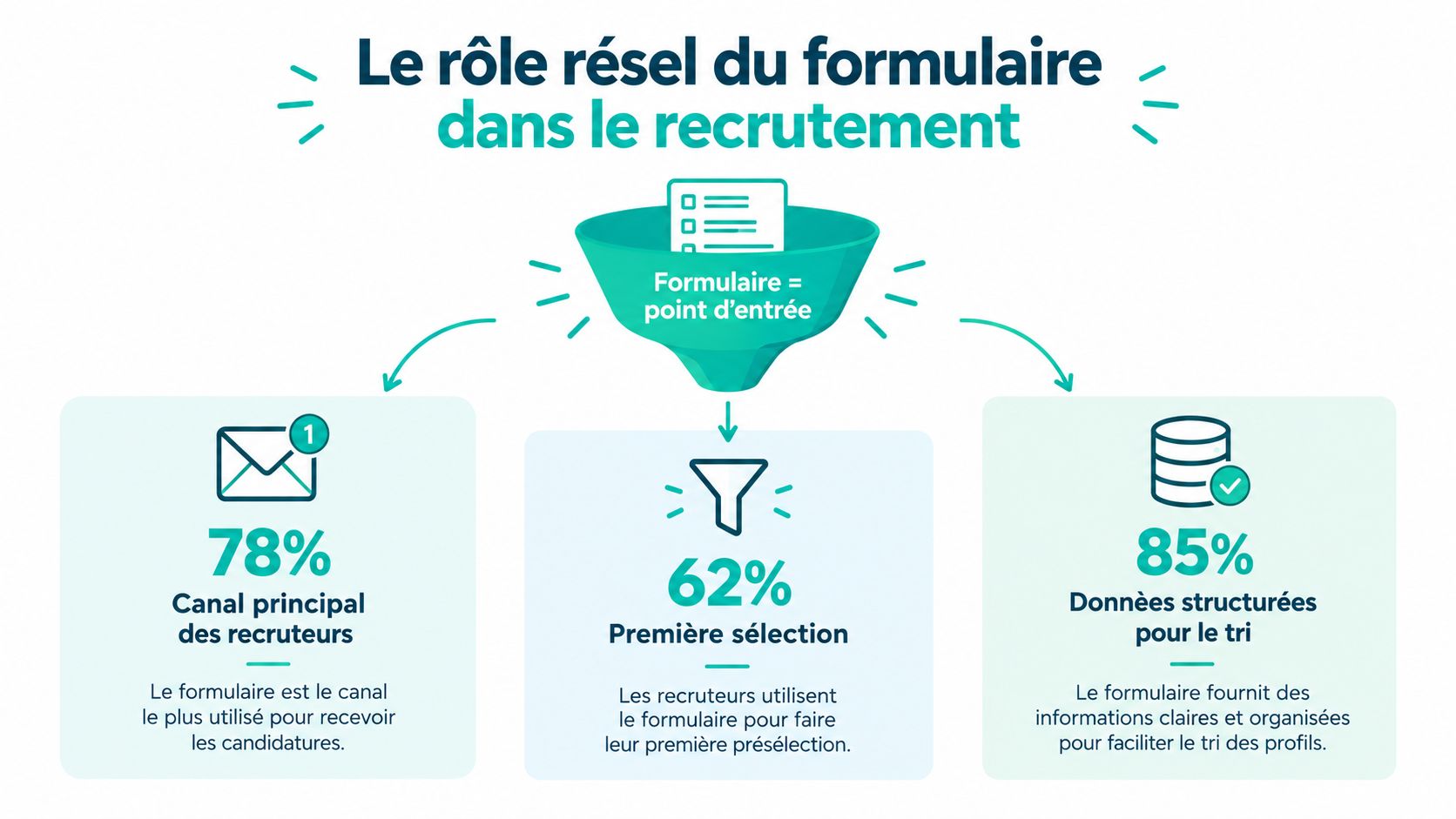
The online job application form has replaced much of the manual exchange, but it hasn’t erased traditional practices. In the UK, recruiters still combine multiple channels, with digital tools now deeply embedded in recruitment processes, such as posting job ads online, browsing CV databases, and using professional or social networks, according to studies by the UK’s Department for Work and Pensions on digital recruitment trends. When a job is posted online, platforms like the UK’s Universal Jobmatch also play a key role in the recruitment ecosystem, showing that a form never stands alone but fits into a complete chain of collection, sorting, and transmission. France Travail and the Role of Digital in Recruitment
An Entry Point, Not Just a Form
In practice, the form structures data that recruiters quickly compare. That’s why a poorly filled field, a vague answer, or a mismatched CV can weigh far more than candidates realize. The volume handled by public platforms illustrates this well, with millions of new job postings and flows moving from one digital space to another, requiring each application to be readable, usable, and consistent. Job postings published by France Travail Q4 2024
Practical rule: your form should not only be “submitted,” it must be easily processed by the person receiving it.
This is also why a good form is not just an administrative interface. It can serve distribution, collection, and preselection. If you apply via a poorly designed tool, your file may be complete but misinterpreted or technically invisible in the application pile.
What Recruiters Actually Expect
Most often, a form checks four simple but decisive things: whether you fit the role, whether your contact details are reliable, whether your CV is readable, and whether your answers align with the recruiter’s sorting criteria. That’s why you should treat it as a first filter, not just an administrative task to rush through.
A clean application increases your chances of reaching the next stage smoothly. In recruitment processes where digital dominates, it’s not paper that disappears but tolerance for poorly prepared applications.
Preparing Your Information Before Starting
The biggest trap is starting to apply on the fly. A mistyped email, an approximate job title, a wrongly dated experience, and you immediately create discrepancies between the form fields and attachments. If the form crashes or the session times out, you also lose track of your answers.
The best practice is to prepare a separate document before opening the form. For a candidate portal, gather your identity, contact details, experiences, availability, mobility, and other relevant information in advance. The UK’s Jobcentre Plus advises candidates to complete a profile with education, work experience, availability, mobility, and motivations, confirming that a well-prepared file avoids uncontrolled copy-pasting. France Travail Recruitment Portal
What to Have on Hand
Start with a clean version of your CV, then keep aside elements frequently requested in forms. This also includes links to your professional profiles, your actual availability, and if needed, your mobility status.
- Identity and contact details: full name, phone number, email, city.
- Experience and job titles: exact titles, companies, dates, main responsibilities.
- Mobility and availability: earliest start date, geographic area, preferred work schedule.
- Attachments to prepare: updated CV, cover letter, any recommendations.
Preparing these elements in one document reduces copy errors and speeds up form filling, especially when multiple screens are involved.
If you don’t yet have a clear and consistent CV, prepare it before filling anything out. A tool like this CV builder can help you quickly structure your information, provided you review each section before submission.
Why Preparation Makes All the Difference
Online forms often require repetitive fields, even when the information is already in your CV. Having your answers ready avoids hesitation and reduces discrepancies between what you type and what you upload. This is especially helpful when the process involves multiple screens or when applying on mobile.
Preparing answers in advance also helps you write more concisely. Recruiters prefer short, precise, and coherent information over improvised texts, especially when comparing multiple applications for the same job.
Recognizing Abusive Requests and Protecting Your Data
Not all fields in a form are legitimate. In the UK, the Information Commissioner’s Office (ICO) reminds that recruiters can only request information directly related to the job, and free-text fields should remain relevant, appropriate, and not excessive. The ICO also clarifies that data must be strictly necessary for selection, with clear examples, such as the National Insurance number which should not be requested before hiring. Legal framework explained by the Défenseur des droits
What You Can Rightfully Refuse
A question about your ability to perform the job may be legitimate. A request for personal information unrelated to the role is not. In digital forms, be wary of fields that appear optional but are actually mandatory, or forced registration in a CV database without clear explanation.
You also have rights to access, rectify, and object to your data. Practically, this means you are not obliged to let your data circulate unchecked, especially if you submitted your file to a talent pool or if the information seems reused for other roles. Recruitment and UK Data Protection Rules
If a piece of data doesn’t help assess your ability to do the job, ask why it’s required.
Good Practices to Limit Bias
The best way to reduce exposure to bias is to share no more than necessary. The Défenseur des droits recommends anonymizing applications by removing elements unrelated to skills, such as name, age, address, family status, or photo, when possible. If a form asks for information that could lead to questionable selection, keep records of the process, screenshots, and context.
This also applies to candidates with disabilities or accessibility issues. A platform may be widely used but technically imperfect, so know how to request an alternative channel or report a blockage if the form prevents you from continuing. The goal isn’t just to “finish,” but to preserve your ability to apply fairly.
Blocking Errors to Avoid Before Submission
The moment just before sending is when mistakes cost the most. A mistyped email, an unsuitable CV, a forgotten attachment can make your file hard to find or unusable. The UK’s Jobcentre Plus guidance shows this control logic: the candidate reviews information, can correct contact details, then confirms sending to the recruiter.
Checks That Prevent Simple Failures
Before clicking send, first review the fields the recruiter will see first. This is where flaws are spotted quickest.
- Accurate contact details: active phone, error-free email, consistent city.
- Correct attached CV: right version, proper file name, matching the job applied for.
- Concise answers: clear wording, no overly long or off-topic sentences.
- Job title: identical to the ad to avoid confusion.
One detail matters especially: consistency between your CV, the form, and the cover letter. If your experience says one thing in the PDF and another in the free text, the recruiter won’t know which to trust first.
Final Review Before Sending
A good habit is to reread as if you were the recruiter. Does the file match the job? Are attachments present? Does the file name correspond to the role? Is everything readable on both mobile and desktop? This quick check prevents lost applications due to purely technical reasons.
The same applies when using ATS or sorting software. If your content is poorly structured, even the best tracking system won’t fix a messy form. Tips for Passing ATS Filters
Saving Time with Pre-Filling and AI
When you apply often, the real fatigue comes from repetition. Entering the same contact details, rewriting the same answers, adapting the same letter again and again wastes time and focus. The goal isn’t to automate blindly but to remove mechanical tasks so you can focus your energy on substance.

What Really Saves Time
A password manager helps fill recurring fields faster. Response templates avoid rewriting the same introduction, especially for motivation, availability, or experience level questions. AI can then adapt the tone and style, provided you review each answer to ensure it truly fits the job.
The tool should serve your application, not the other way around. The cover letter generator can save time on the first draft and let you adjust tone, keywords, and concrete examples before sending.
The right habit is to reuse the structure, not copy-paste answers without checking they fit the specific job.
Maintaining Quality Without Losing Speed
The most effective method is to prepare three reusable blocks: a short introduction, a motivation answer, and a condensed version of key experiences. Then only adapt what really changes: company name, highlighted skills, and phrasing of duties. This avoids raw copy-pasting, which often leaves visible traces in the text.
Jobshift supports this quick personalization approach by helping adapt CVs, cover letters, and short answers to job requirements. The goal isn’t to fill forms for you but to reduce friction between your prepared documents and the specific fields each recruiter requests.
Frequently Asked Questions About Online Applications
Should I Apply If the Form Seems Too Long?
Yes, if the job really fits you and is worth the effort. A long form isn’t necessarily a bad sign; it may simply reflect a more structured screening process. However, if fields seem intrusive or unrelated to the role, be cautious before proceeding.
What to Do If the Form Bugs When Submitting?
Take a screenshot, check if your attachment uploaded, then try again after refreshing the page. If the problem persists, switch device or browser, then contact the recruiter with a brief message explaining the issue. Always keep a copy of your text and CV.
Can I Fill Out an Application Form on Mobile?
Yes, but only if the form is truly mobile-friendly. Long processes, poorly aligned fields, or hard-to-use dropdowns quickly cause errors. If filling out becomes frustrating, it’s better to finish on a computer.
Should I Fill All Optional Fields?
Not necessarily. Only complete fields that genuinely support the role or clarify your profile. If a field asks for personal information irrelevant to selection, it’s better to keep it minimal.
How to Know If My Application Was Sent?
Always look for a confirmation message on screen or in your email inbox. If none appears, check your browsing history, spam folder, and any automatic acknowledgments. When in doubt, a polite follow-up with the recruiter is more effective than sending a duplicate application.
If you want to save time without rushing your applications, Jobshift can help you tailor your documents and answers to the jobs you target while keeping full control over the final content. Try Jobshift to prepare faster, cleaner, and better-aligned applications for every form.
À propos de l'auteur
Chris Massie, cofondateur de l'appli Jobshift. Il travaille sur l'outil depuis sa première version : analyse du CV face à l'offre, réécriture automatique des blocs faibles, candidatures envoyées en mode swipe. Profil LinkedIn